What is Customer Journey Mapping? A Complete Guide
Learn what customer journey mapping is, its core benefits, and a step-by-step guide to creating your own visual map to improve customer experience.
What is Customer Journey Mapping?
Customer journey mapping is the process of creating a visual diagram that illustrates every step a customer takes when interacting with your brand, product, or service. As defined by Salesforce, it is the act of creating a customer journey map which visually represents a customer's experience with a brand. This visual representation, often called a CJM, charts the path from initial awareness through to purchase and beyond, encompassing all touchpoints and emotional states along the way.
Think of it as a storyboard for your customer's experience. It moves beyond abstract data points to tell a cohesive story, helping teams empathize with the customer and see the business from their perspective. A map provides a unified view of how customers engage across multiple channels, which is crucial in today's fragmented digital landscape.
Why is Customer Journey Mapping Important?
Creating a customer journey map is not just an academic exercise. It delivers tangible strategic benefits by aligning your organization around the customer's reality.
- Uncover Pain Points: The map visually pinpoints barriers that delay or prevent conversions, allowing you to proactively address friction. Is your checkout process too long? Is support hard to find? The map reveals these issues clearly.
- Gain Customer Insights: It moves beyond what customers do to explore why they do it. Journey maps provide deep insights into customer motivations, needs, and pain points, enabling you to tailor messaging and interactions for maximum relevance.
- Break Down Silos: By providing a single, shared view of the customer experience, maps enhance communication between your business and its clients (and between internal departments like marketing, sales, and support).
- Optimize the Full Lifecycle: A comprehensive map highlights critical post-purchase stages, ensuring you can improve onboarding, retention, and opportunities for upselling or advocacy.
For visual thinkers and strategists, tools like ClipMind can transform this mapping process. Its AI-powered mind mapping capabilities help you quickly structure these complex journeys, collaborate with your team, and turn insights into actionable plans.
The Core Components of a Customer Journey Map
A robust customer journey map is more than a simple flowchart. It synthesizes multiple data layers to create a rich narrative. According to experts from IBM and Miro, key components include:
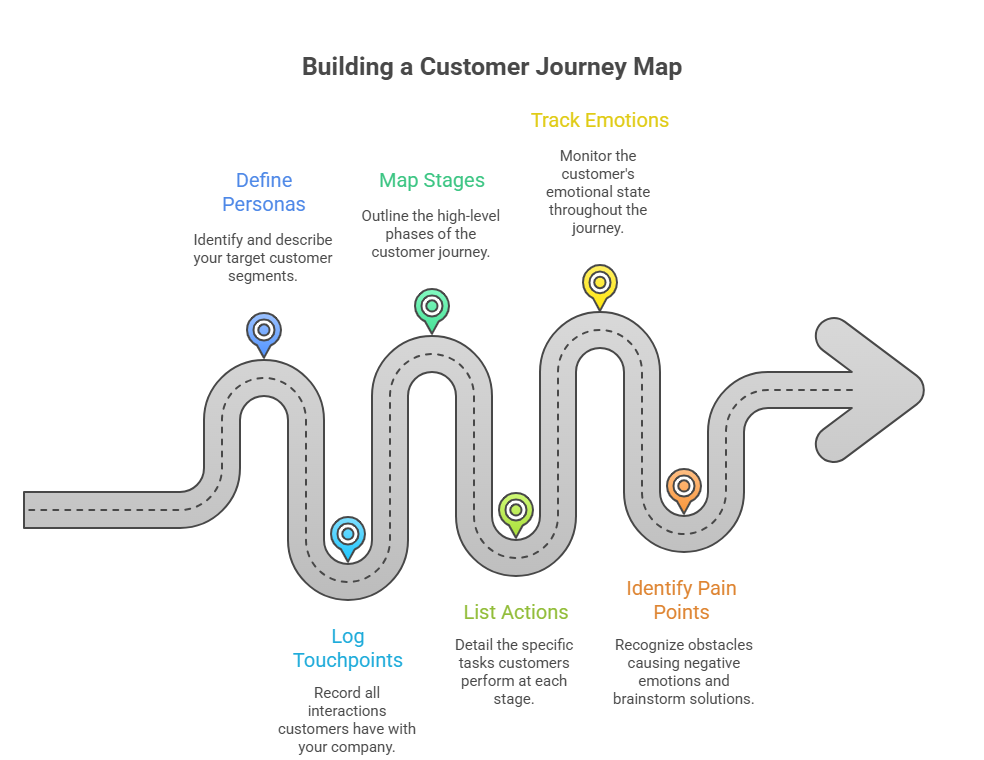
- Personas: Who is taking this journey? Define your target customer segment with key demographics, goals, and motivations.
- Touchpoints: Every single point of interaction your customers have with your company must be logged. This includes website visits, social media interactions, ads, customer service calls, and in-store experiences.
- Stages: The high-level phases of the journey, such as Awareness, Consideration, Purchase, Retention, and Advocacy.
- Actions: The specific tasks the customer performs at each stage (e.g., "searches for product reviews," "adds item to cart").
- Emotions: Often visualized as a line graph, this tracks the customer's emotional state (frustration, confusion, satisfaction) at each touchpoint.
- Pain Points & Opportunities: Identify obstacles causing negative emotions and brainstorm potential solutions or improvements.
How to Create a Customer Journey Map: A Step-by-Step Guide
Creating a customer journey map involves a step-by-step approach to understanding your customers’ experiences. Here is a practical framework you can follow.
1. Define Your Map's Scope and Goals
Start by asking: What specific journey am I mapping? Is it the journey for a new customer purchasing a subscription, or an existing customer seeking support? Define a clear objective, such as "reduce cart abandonment by 15%" or "improve new user onboarding satisfaction."
2. Conduct Customer Research
Your map must be based on real data, not assumptions. Gather insights through:
- Customer interviews and surveys
- Analytics data (website, app)
- Sales and support call logs
- Usability testing
3. List All Customer Touchpoints
Audit every experience that a customer has with a brand, product or service. Document channels (email, social, web, phone), departments involved, and the customer's goal for each interaction.
4. Visualize the Journey
This is where visual thinking tools excel. Plot the identified stages, touchpoints, and actions in a chronological timeline. Use a whiteboard, digital diagram tool, or a specialized platform to build your visual.
5. Layer in Emotions and Pain Points
For each touchpoint, annotate the likely customer emotion. Use color coding or an emotion line. Then, clearly mark the pain points causing dips in sentiment. This is where you identify friction points that hinder their experience.
6. Identify Opportunities and Take Action
The map is useless without action. For every pain point, brainstorm a solution. Assign owners and next steps. This transforms your visualization into a strategic action plan.
From Map to Action with Visual Tools
Customer journey mapping is a foundational practice for customer-centricity. It turns disparate data points into a coherent story, empowering teams to make decisions that genuinely improve the customer experience. By visualizing the process your customers go through when interacting with your company, you align your entire organization around their needs.
For professionals who think visually, leveraging a tool like ClipMind can streamline this entire process. Its mind mapping interface is ideal for brainstorming journey stages, organizing research notes, and collaboratively building the map itself, ensuring your insights lead to real-world improvements.