How to Build SEO Topic Clusters: A Step-by-Step Guide
Learn how to build effective SEO topic clusters to boost your website's authority and rankings. This guide covers pillar pages, internal linking, and strategy.
What Are SEO Topic Clusters
A topic cluster is a group of interconnected, thematically related pages on a website designed to build authority on a subject. Each cluster centers on a single pillar page that provides a broad overview of a core topic. This page is then supported by multiple subpages that dive deep into specific subtopics. This structure, often visualized as a hub-and-spoke model, signals to search engines that your content is comprehensive and authoritative on a subject Topic Clusters for SEO: What They Are & How to Create Them.
The primary goal is to organize content thematically rather than by isolated keywords. By linking these pages together, you create a semantic network that helps search engines understand the depth of your expertise, which can lead to higher search rankings. This approach moves beyond targeting single keywords to owning entire topics.
Why Topic Clusters Are Essential for Modern SEO
Implementing a topic cluster strategy offers several concrete benefits for your website's performance and user experience.
- Builds Topical Authority: Search engines like Google reward websites that demonstrate deep, comprehensive knowledge on a subject. A well-structured cluster shows you are a true expert, not just a surface-level resource.
- Improves Internal Linking and Crawlability: The internal linking between your pillar page and cluster content creates clear pathways for both users and search engine crawlers. This helps distribute page authority (link equity) throughout the cluster and ensures all important pages are discovered.
- Enhances User Experience: Visitors can easily navigate from a broad overview to the specific, detailed information they need. This keeps them engaged on your site longer, reducing bounce rates and increasing the likelihood of conversion.
- Targets Multiple Search Intents: A single cluster allows you to rank for a variety of related search terms—from broad informational queries (answered by the pillar page) to specific, long-tail questions (answered by cluster content) Topic Clusters for SEO: What They Are & How to Create Them.
Organizing content this way can feel complex. Visual tools like a mind map are perfect for planning the relationships between your pillar page and cluster content. ClipMind helps visual thinkers map out these connections clearly before writing a single word.
A Step-by-Step Guide to Building Topic Clusters
Building an effective topic cluster is a systematic process. Follow these steps to create a foundation for your content strategy.
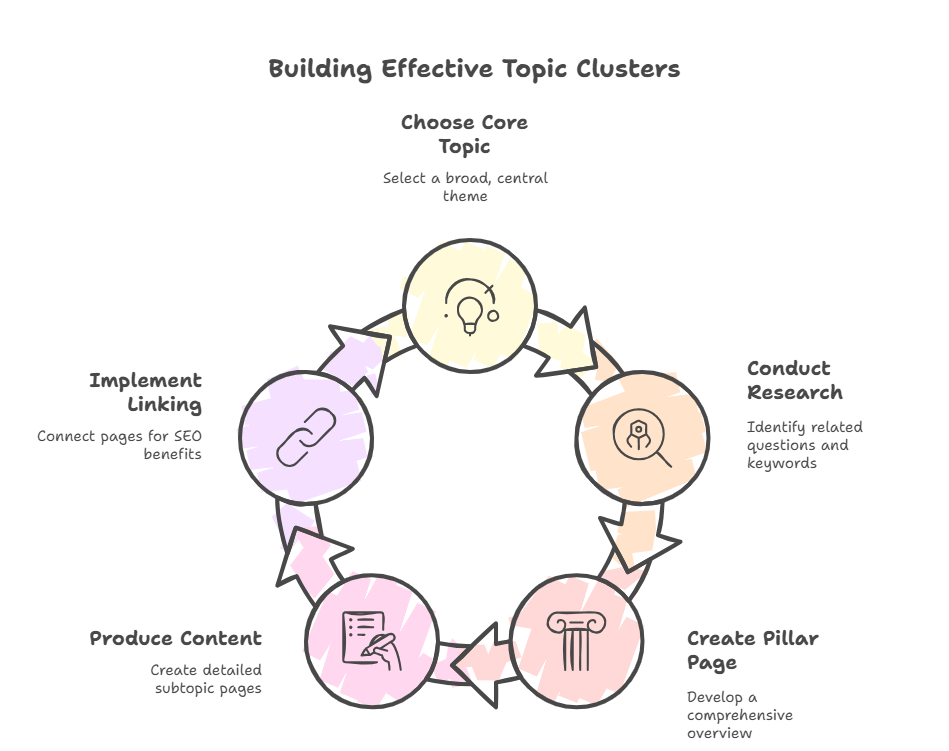
Step 1: Choose Your Core Pillar Topic
Start by selecting a broad, central theme that is fundamental to your business and valuable to your audience. This should be a high-level topic that can be broken down into many subtopics. A good practice is to start your topics around each service or product that you offer. Ensure each core topic is distinct with minimal overlap to avoid cannibalizing your own content.
For example, a digital marketing agency might choose "Content Marketing" or "SEO" as a pillar topic. This topic must align with your business goals and address the primary interests of your target customers Topic Clusters: A better way to organize your content for SEO.
Step 2: Conduct Keyword and Topic Research
Once your pillar topic is set, identify all the related questions, subtopics, and keywords your audience is searching for. This forms your keyword cluster. Use tools to find:
- Pillar Keywords: Broad, head terms for your main page (e.g., "content marketing strategy").
- Cluster Keywords: Specific long-tail queries and question-based keywords for your subpages (e.g., "how to write a blog post," "content calendar template").
The goal is to create a single, dedicated page for each term in this cluster, allowing you to rank for more search terms collectively. Tools like ClipMind's SEO Keywords Brainstormer can help you systematically generate and organize these related terms.
Step 3: Create Your Pillar Page
Your pillar page is the cornerstone of the cluster. It should be a comprehensive, high-quality resource that provides a complete overview of the core topic. It doesn't need to cover every subtopic in extreme depth, but it should introduce them and link out to the more detailed cluster content. Think of it as a definitive guide or ultimate resource.
Step 4: Produce Supporting Cluster Content
Now, create the individual cluster pages (blog posts, guides, etc.) that each focus on one specific subtopic or question from your keyword research. Each piece should be the best answer available for that particular query. Ensure the content is useful, authoritative, accurate, and relevant to your audience.
Step 5: Implement Strategic Internal Linking
This is the step that ties the cluster together. You must internally link all of the content within the topic cluster to and from each other and the hub page.
- From Pillar to Cluster: Link from your pillar page to each relevant cluster page.
- From Cluster to Pillar: Every cluster page should link back to the main pillar page.
- Between Cluster Pages: Link related cluster pages to each other where it provides additional context or value.
This network of links is what signals the relationship and collective authority to search engines.
Tools and Templates to Get Started
You don't have to build clusters from scratch alone. Leverage available resources to streamline the process.
- SEO Platforms: Many tools offer content templates and cluster planning features. For instance, some platforms allow you to enter the page’s keyword cluster and create a content template.
- Free Templates: Look for guides that provide templates, workflows, and a repeatable process for building topical authority.
- Visual Planning Tools: Before you write, use a mind mapping tool to visually plot your pillar topic and all its connecting subtopics. This clarifies the structure and ensures you haven't missed key areas.
For a hands-on start, use ClipMind's AI Outline Maker to generate a structured content outline for your pillar page based on your core topic.
Building SEO topic clusters is a strategic investment in your website's long-term authority and visibility. By moving from a scattered keyword focus to a structured, topic-based model, you create a better experience for users and a stronger signal for search engines. Start with one core topic, map it out thoroughly, and use strategic internal linking to weave your content into a powerful network of information.