From Video to Visual Insight: Introducing ClipMind’s Video Summarizer
In an era where video has become a primary medium for learning, analysis, and communication, we face a new cognitive challenge: how to efficiently extract, structure, and retain the knowledge embedded within long-form visual content. The traditional approach—watching, pausing, and taking notes—fragments attention and often fails to capture the relational structure of ideas. We built the Video Summarizer to transform passive viewing into an active, structured thinking process.
The Problem with Linear Video Consumption
Video content is inherently temporal and linear. To understand a lecture, a product review, or a documentary, you must follow its chronological flow. This linearity makes it difficult to grasp the hierarchical relationships between concepts, to see the overarching argument separate from its supporting details, or to quickly locate and review key moments. The result is often a fragmented mental model, where the "big picture" gets lost in a sequence of details. Our goal was to create a tool that breaks this linear constraint, allowing the viewer to comprehend structure and detail simultaneously.
What the Video Summarizer Does
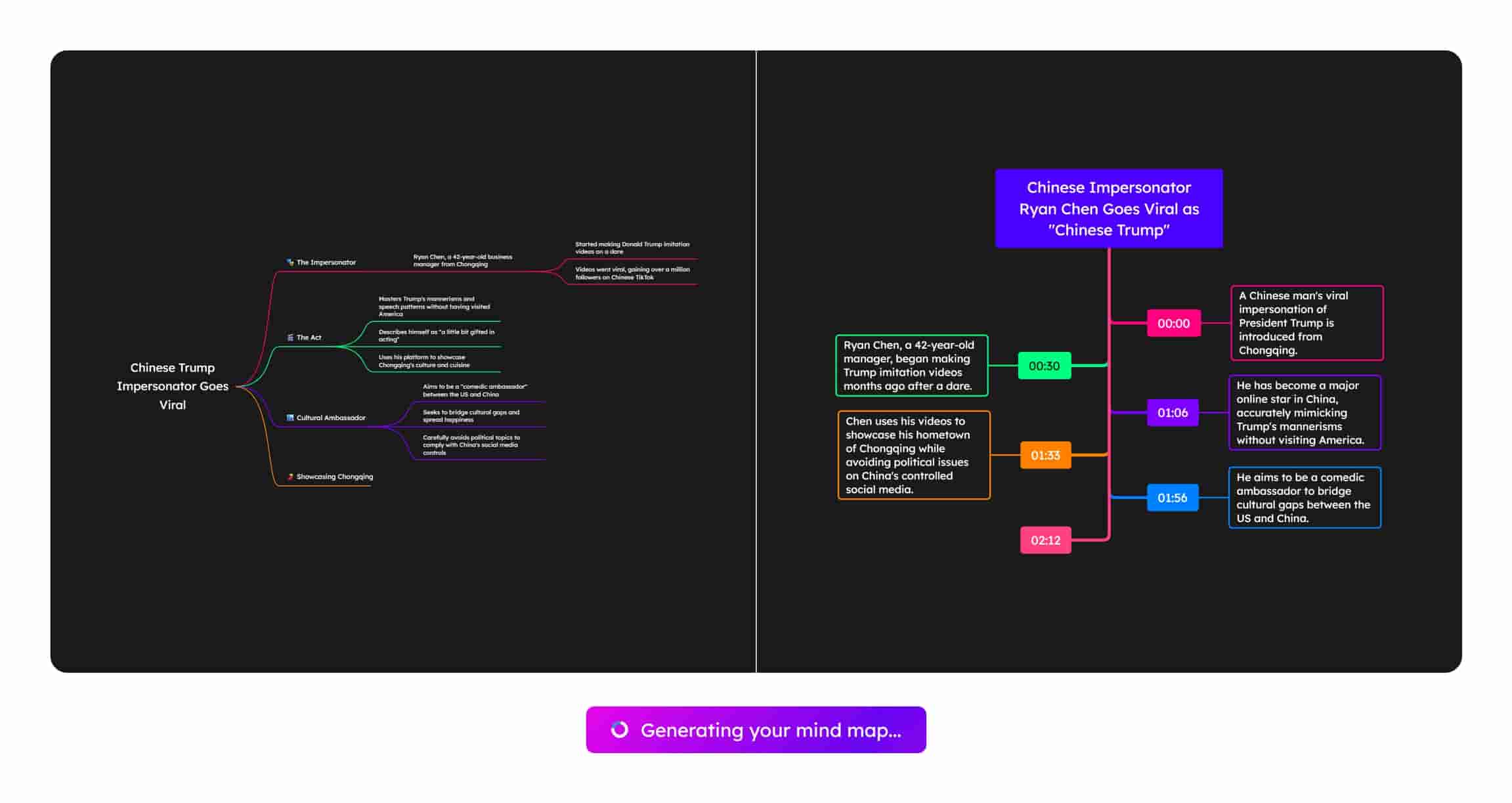
The Video Summarizer is a dedicated tool within ClipMind that accepts a YouTube URL and generates a dual-perspective analysis. It doesn't just transcribe; it comprehends. The AI parses the video's narrative, identifies core themes and supporting arguments, and structures this understanding into two synchronized views:
- Mind Map View: A visual overview that displays the video's content as a hierarchical network of ideas. The central node represents the main topic, with branches extending to key themes, subtopics, and critical points. This view answers the question, "What is this video about, structurally?"
- Timeline View: A linear, timestamped list of highlights that corresponds to the mind map's nodes. Each highlight pinpoints a specific moment in the video where a key point is discussed. This view answers the question, "When and how is each point made?"
This dual-view approach separates the conceptual skeleton from its temporal delivery, giving you both the map and the itinerary.
Typical Use Cases
- Accelerated Learning & Research: A student can summarize a lengthy lecture series into a single, editable mind map, connecting concepts across videos and using the timeline to quickly revisit complex explanations for review.
- Content Analysis & Competitive Review: A product manager researching a competitor's launch presentation can generate a mind map to deconstruct their messaging strategy, feature highlights, and value propositions at a glance, bypassing the need to watch the entire presentation multiple times.
- Meeting & Workshop Documentation: A team lead can summarize a recorded all-hands meeting or a workshop session. The mind map captures the agenda and outcomes, while the timeline allows team members to find and replay specific discussions or decisions.
- Content Creation Preparation: A creator planning a response video or analysis can quickly digest source material, structuring the original video's arguments visually to plan their own counterpoints or expansions more effectively.
How to Use the Video Summarizer
-
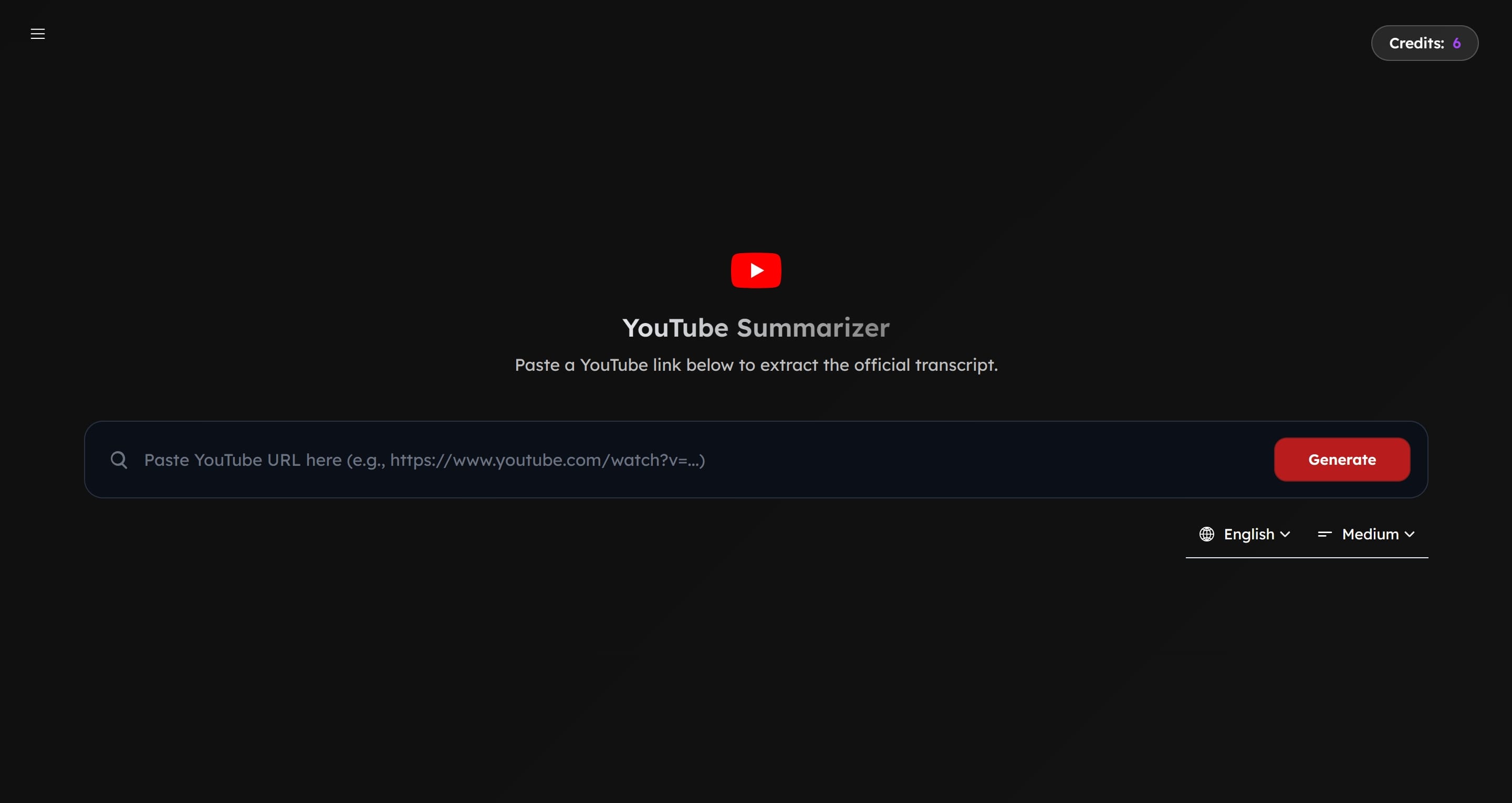
Navigate to the dedicated Video Summarizer page.
-
Paste the URL of the YouTube video you wish to summarize into the input field.
-
Configure your output. Select your preferred language for the summary and choose a detail level (e.g., concise or comprehensive) to guide the AI's depth of analysis.
-
Click the "Generate" button. ClipMind's AI will process the video's audio and visual context to build its understanding.
-
Once processing is complete, you will be presented with the dual-view interface: the interactive mind map on one side and the timestamped highlight timeline on the other.
-
Edit and Personalize: The generated mind map is fully editable. Click on any node to modify its text. Drag and drop nodes to reorganize the hierarchy. Use the toolbar to change layout themes, add color for emphasis, or insert stickers and illustrations to enhance memorability.
-
Toggle Perspectives: Switch between the Mind Map View and a linear Markdown View with one click. This is invaluable for when you need to transition from visual brainstorming to structured writing.
-
Export Your Work: Click the "Export" button to save your mind map as a high-resolution image (PNG, JPG), a scalable vector graphic (SVG) for further design work, or as a Markdown file to integrate directly into your notes or documentation.
-
Share and Collaborate: Use the "Share" button to generate a link to your mind map. Enable the "Allow fork" option to let others create their own editable copies, facilitating collaborative analysis or group study.
-
Revisit Your Insights: All your summarized videos are saved in your personal workspace. You can review them in a list, a visual gallery, or a calendar view, transforming ClipMind into a growing library of your visual understanding.
Key Capabilities and Notes
- Language and Detail Control: The summarization is not a one-size-fits-all process. You direct the AI's focus by choosing the output language and the level of detail, ensuring the result matches your intent, whether for a quick scan or a deep dive.
- From Consumption to Creation: The feature is designed to close the loop. It starts with consumption (the video) and moves seamlessly into active creation (editing the map, adding your own ideas, exporting for use elsewhere). The AI-generated structure is a starting point for your thinking, not an end point.
- Privacy-First Processing: The summarization occurs through secure, purpose-built AI models. Your video URLs and the generated content are not used for training other models or shared with third parties.
Wrap Up
The Video Summarizer is built on a simple premise: tools should help us overcome the inherent limitations of the media we use to think. By extracting the conceptual framework from a temporal flow and presenting it as an editable, visual structure, it turns video watching from a passive activity into an act of knowledge construction.
If you regularly use video for learning, research, or analysis, this tool can change how you engage with content. It’s available now, and we are eager to see how you integrate it into your workflow.
You can access the Video Summarizer directly at: https://clipmind.tech/summarizer/youtube