You’re staring at a 50-slide PowerPoint deck. The meeting starts in 20 minutes. Your task is to grasp the core argument, identify the key data points, and prepare intelligent questions. Manually skimming each slide is slow, and you risk missing crucial connections buried in the details.
This is the exact problem an AI PPT summarizer is designed to solve. An AI PPT summarizer is a tool that uses artificial intelligence and natural language processing (NLP) to automatically analyze the content of a PowerPoint presentation and generate a concise, coherent overview of its most important points.
This guide will explain exactly how these tools work, detail their key benefits beyond simple time-saving, compare the leading options, and show you how to integrate them into your workflow to transform how you consume and create from presentation content.
How Does an AI PPT Summarizer Work? A Technical Breakdown
At its core, an AI PPT summarizer automates the cognitive process a human would use to review a deck: read, comprehend, distill, and summarize. It does this through a multi-step pipeline powered by advanced AI models.
Step 1: Content Extraction and Parsing
The first challenge is accurately reading the PowerPoint file. The tool must parse the .pptx structure to distinguish between titles, body text, speaker notes, and embedded objects like images and charts.
Modern tools use a combination of methods. For standard text within shapes and tables, they can directly access the XML structure of the PowerPoint file. For more complex layouts or to extract text from images within slides, they may employ optical character recognition (OCR) and advanced multimodal AI models. These models, like GPT-4o or Gemini, can understand the context of visual elements, interpreting a chart's axes labels or the text in a diagram, which traditional OCR might miss. However, extracting perfect text from complex layouts with overlapping elements or unique fonts remains a technical challenge.
Step 2: Semantic Analysis and Key Point Identification
Once the text is extracted, the AI performs semantic analysis. This is where Natural Language Processing (NLP) comes into play. The AI doesn't just see words; it understands concepts, context, and relationships.
The system analyzes the text to identify main themes, rank sentences by their importance, and understand the hierarchical structure (e.g., slide title vs. bullet point). It uses techniques like keyword frequency, topic modeling, and semantic similarity to determine what constitutes a "key point." Advanced models are trained to recognize the narrative flow of a presentation, distinguishing between an introductory example and a conclusive recommendation.
Step 3: Summary Generation and Output Formatting
Finally, the AI generates the summary. There are two primary approaches:
- Extractive Summarization: This method pulls the most important sentences directly from the source material and strings them together. It's faster and ensures factual accuracy but can result in less fluid summaries.
- Abstractive Summarization: This approach comprehends the content and generates new sentences to convey the core ideas. It produces more readable, concise summaries but carries a slightly higher risk of hallucination or misrepresentation.
The output can then be formatted as a plain text paragraph, a bulleted list, or—in more advanced tools like ClipMind—a structured, editable mind map.
Key Benefits of Using an AI Tool for PowerPoint Summarization
The value of an AI PPT summarizer extends far beyond just saving a few minutes. It enhances how you understand, retain, and act on information.
Dramatic Time Savings and Increased Productivity
The most immediate benefit is the massive reduction in review time. What could take an hour of focused reading can be condensed into a one-minute AI processing time and a five-minute review of the summary. A study on generative AI in the workplace found that tools like these can lead to significant productivity gains, especially for processing complex information. This reclaimed time can be redirected to higher-value tasks like critical analysis, decision-making, or content creation.
Improved Comprehension and Knowledge Retention
A well-structured summary provides a "bird's-eye view" of the presentation's narrative. It clarifies the logical flow from problem statement to solution, helping you grasp the core argument without getting lost in details. When the summary is a visual mind map, the benefits are amplified. Cognitive science research indicates that nonlinear formats like mind maps are superior to linear notes for retention and recall because they visually map relationships between ideas, mimicking how the brain organizes information.
Enhanced Accessibility and Inclusivity
AI summaries make dense content more accessible. They serve as excellent study aids for students, efficient briefing documents for busy executives, and helpful tools for people who prefer auditory or kinesthetic learning. Summaries can also be used to generate alternative text formats for accessibility purposes.
Consistency and Reduction of Human Bias
An AI provides a consistent, objective baseline. While human reviewers might unconsciously emphasize points that align with their pre-existing beliefs or miss details they find less interesting, an AI applies the same analytical criteria across the entire deck. This ensures a more balanced first pass, which you can then subjectively evaluate and build upon.
Beyond Text: The Unique Advantage of Visual Mind Map Summaries
Most AI summarizers stop at a block of text or a bulleted list. This is useful, but it's still a linear format. For complex presentations where ideas interconnect across slides, a visual representation is far more powerful.
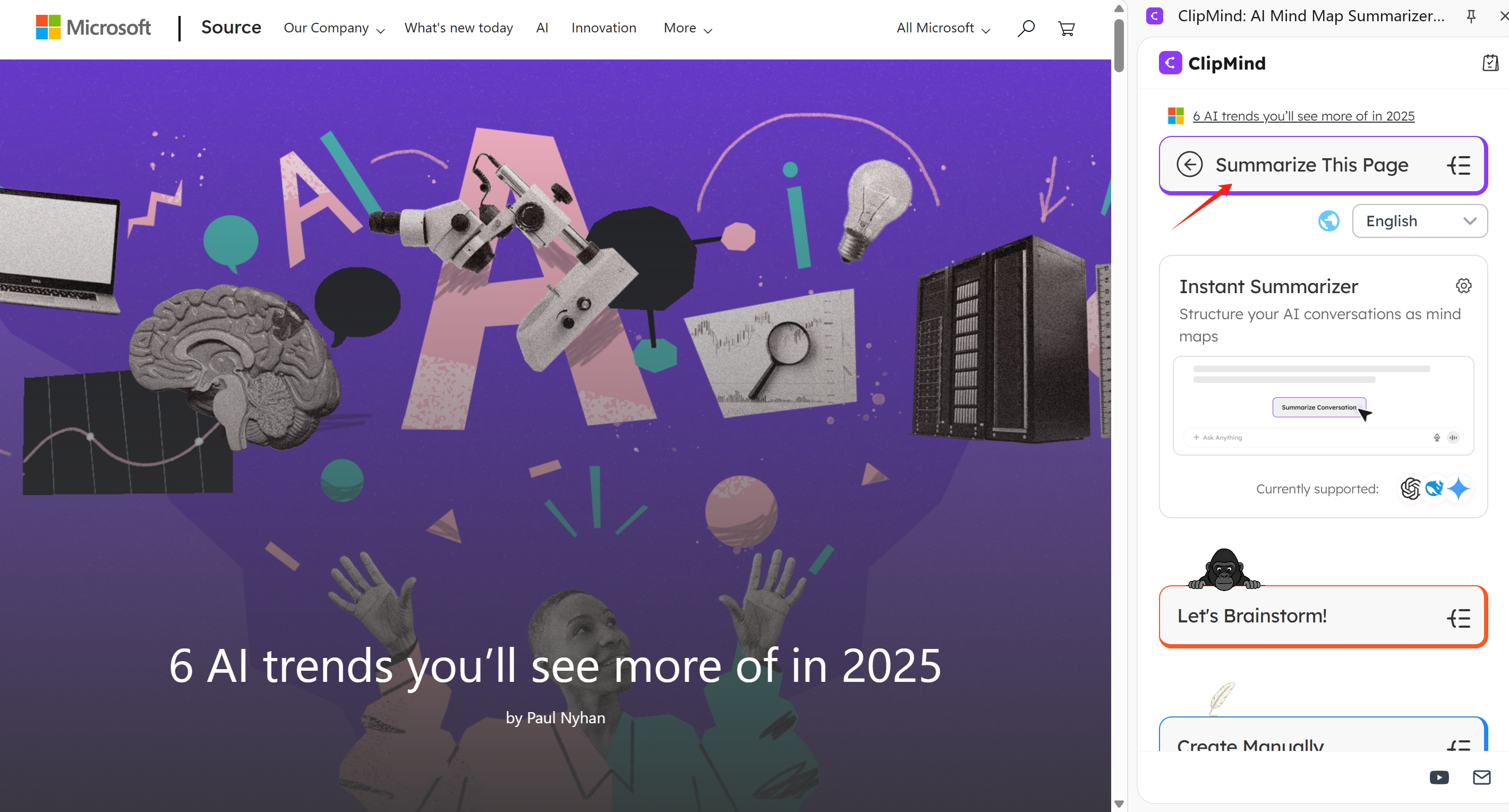
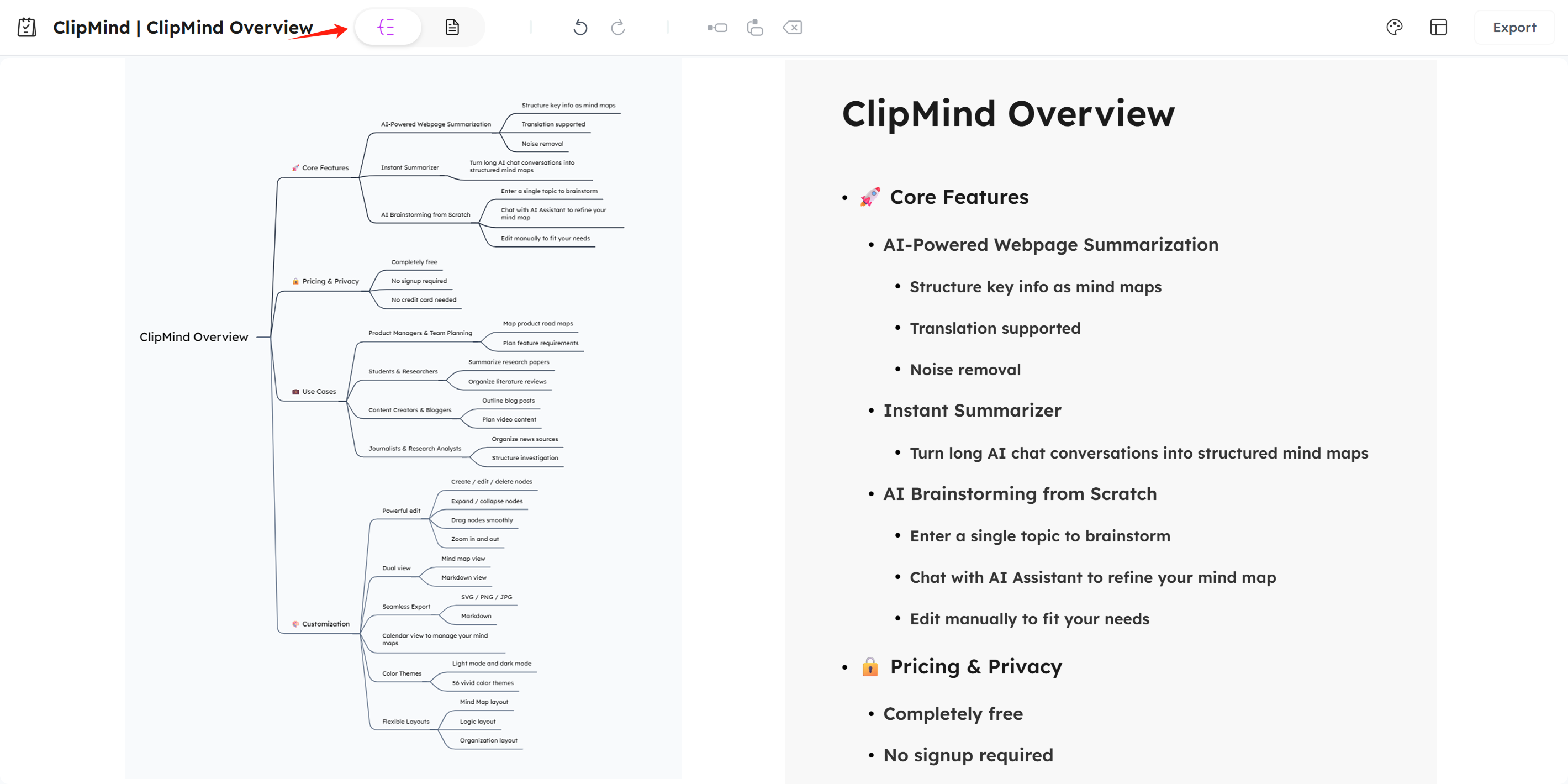
This is where a tool like ClipMind differentiates itself. Instead of a text summary, it generates an editable AI mind map from your PowerPoint file.
Seeing the Big Picture and Connections
A mind map transforms the linear sequence of slides into a spatial, hierarchical overview. The central topic becomes the core, with main branches representing key themes, and sub-branches detailing supporting arguments and data. This allows you to instantly see how different sections of the presentation relate to each other, revealing the underlying structure that might be obscured in a slide-by-slide review.
From Passive Review to Active Ideation
A text summary is an endpoint. An editable mind map in ClipMind is a starting point. Once your PPT is summarized into a map, you can immediately switch to the integrated AI assistant to brainstorm questions, expand on specific nodes with further research, or identify gaps in the source material. This turns the passive act of consumption into an active session of synthesis and ideation, bridging the gap between research and creation.
Essential Features to Look for in an AI PPT Summarizer
When evaluating tools, consider this checklist to find one that fits your workflow, not just a single task.
| Feature Category | What to Look For | Why It Matters |
|---|---|---|
| Input Flexibility | Support for .pptx, .pdf (of presentations), and Google Slides links. Batch processing for multiple files. | You need to summarize decks from various sources, not just one file type. |
| Output Format & Customization | Options beyond plain text: bullet lists, detailed reports, and visual mind maps. Full editability of the output. Export options (PNG, Markdown, etc.). | A static text block has limited utility. An editable, exportable mind map can become a living document for planning and communication. |
| Accuracy & Control | Ability to adjust summary length (key points vs. detailed). Option to exclude specific slides or sections. | You need to tailor the output to your specific need, whether it's a 30-second overview or a comprehensive study guide. |
| Workflow Integration | Availability as a browser extension, web app, or desktop integration. Seamless fit into your research > think > create pipeline. | The tool should reduce friction, not create it. A Chrome extension that works where you research (like ClipMind's) is more efficient than a standalone website. |
Practical Use Cases and Workflow Examples
For Students and Researchers: Literature Review and Study Aid
Scenario: You have collected PDFs of conference presentation slides from three different research groups on a similar topic. Workflow: Upload each PPT to ClipMind to generate a separate mind map summary. Visually compare the maps side-by-side to identify overlapping themes, conflicting data, and unique methodological approaches. Merge insights into a single master map that forms the visual outline for your literature review or helps you pinpoint a research gap.
For Business Professionals: Competitive Analysis and Meeting Prep
Scenario: A competitor releases a 40-slide product launch deck. You need to brief your team by noon. Workflow: Use an AI summarizer to instantly distill the deck into a mind map highlighting value propositions, feature differentiators, and pricing strategy. Use the AI assistant within the map to generate a list of strategic discussion questions and potential competitive responses. Share the clear, visual map with your team for alignment.
For Content Creators: From Research to Outline
Scenario: A writer is preparing a deep-dive article on "The Future of Renewable Energy" and has gathered expert presentation slides from industry webinars. Workflow: Summarize the key PPTs into mind maps using ClipMind. Synthesize the common threads into a single master outline within the mind map editor. Then, use ClipMind's dual-view feature to switch to Markdown mode and export a clean, structured draft outline directly into your writing tool.
Top AI PPT Summarizer Tools Compared
| Tool | Core Offering | Key Output Format | Standout Pro / Con |
|---|---|---|---|
| ClipMind | AI-powered summarization into editable mind maps with an integrated AI assistant for brainstorming. | Interactive, visual mind map (editable). Markdown, PNG, SVG export. | Pro: Transforms summaries into active thinking canvases. Excellent for synthesis and ideation. Con: Focused on visual output; less ideal for those who only want pure text. |
| NoteGPT | General-purpose AI summarizer for videos, audio, and documents. | Text summary with timestamps or bullet points. | Pro: Handles multiple media types. Con: Output is linear text without visual structuring. |
| Plus AI | AI presentation creator and summarizer within Google Slides. | Text summary within the Slides interface. | Pro: Deeply integrated with Google Workspace. Con: Tied to the Google ecosystem; limited output flexibility. |
| Decopy AI | Specialized PPT summarizer claiming to analyze text, charts, and images. | Text-based summary report. | Pro: Focuses on presentation-specific analysis. Con: Output remains a text document. |
| Microsoft Copilot in PowerPoint | AI assistant built directly into Microsoft PowerPoint. | Text summary pane inside the PowerPoint app. | Pro: No upload needed; works natively in PPT. Con: Requires a Microsoft 365 Copilot license; only works within PowerPoint. |
Getting Started with ClipMind for PPT Summarization
Using ClipMind to summarize a PowerPoint is straightforward and designed for a browser-centric workflow.
- Install the Extension: Get the ClipMind Chrome Extension.
- Open the Side Panel: Click the ClipMind icon in your browser toolbar to open the side panel.
- Upload Your File: Navigate to the document summarizer section and upload your
.pptxor.pdfPowerPoint file. You can also summarize a webpage containing a presentation. - Generate & Edit: ClipMind will process the file and generate an editable mind map. Drag nodes to reorganize, use the AI assistant to expand on ideas, or switch layouts.
- Export & Use: Export your mind map as a Markdown file for a report, as an image for a presentation, or share the link for collaboration.
Pro Tip: For best results, ensure your source PowerPoint has a clear textual hierarchy (meaningful slide titles, concise bullet points). This helps the AI accurately map the relationships between concepts.
The Future of AI-Powered Presentation Analysis
The technology is evolving from simple text extraction to true multi-modal understanding. Emerging research focuses on vision-language models (VLMs) that can jointly interpret slides and speech transcripts from video presentations, generating summaries that capture both visual and verbal rhetoric. Future tools may not only summarize but also generate interactive Q&A sessions based on deck content or automatically create comparative analyses of multiple presentations.
The fundamental shift is from AI as a passive summarizer to an active cognitive partner. Tools like ClipMind are at the forefront of this shift, recognizing that the goal isn't just to read faster, but to understand better and create more effectively. By turning dense presentations into structured, visual knowledge maps, they close the loop between information consumption and insight generation.
Conclusion
An AI PPT summarizer is more than a convenience; it's a cognitive tool that addresses the modern challenge of information overload. By automating the initial distillation of lengthy presentations, it frees up your mental bandwidth for higher-order thinking. When you choose a tool that offers visual, editable output like a mind map, you gain not just a summary, but a dynamic workspace for synthesis, analysis, and ideation. In a world saturated with presentations, the ability to quickly grasp their essence and build upon their ideas is a decisive advantage.
Learn More
- How to Create Mind Maps from Webpages: Complete Guide – Extend the principles in this guide to any online content.
- Free Mind Map Tools Comparison: Finding Your Visual Thinking Tool – Explore the broader landscape of mind mapping software.
- A survey of text summarization: Techniques, evaluation and challenges – A deep academic dive into the NLP behind tools like these.
- ClipMind Free AI Tools – Access a suite of free AI tools for brainstorming, writing, and research.
FAQ
What is an AI PPT summarizer? An AI PPT summarizer is a software tool that uses artificial intelligence (AI) and natural language processing (NLP) to automatically analyze a PowerPoint presentation and generate a short, coherent summary of its key points and main ideas.
How accurate are AI PowerPoint summarizers? Accuracy depends on the tool's underlying AI model and the clarity of the source presentation. They are generally very good at extracting main themes from well-structured text. However, they can struggle with highly technical jargon, complex data in charts, or presentations that rely heavily on imagery over text. Always review the output critically.
Can AI summarizers handle PowerPoint files with images and charts? Advanced tools use multimodal AI that can perform optical character recognition (OCR) and interpret visual context to extract text from images and describe chart trends. However, the depth of this analysis varies, and detailed numerical data from complex charts may not be fully captured in a summary.
What's the difference between a text summary and a mind map summary? A text summary (extractive or abstractive) provides a linear, sequential overview. A mind map summary, like the one created by ClipMind, provides a spatial, hierarchical, and visual representation. It shows relationships between ideas more clearly, which can improve retention and spark further connections, making it better for analysis and brainstorming.
Are there free AI PPT summarizer tools? Yes, many tools offer free tiers with limited features, such as a cap on the number of summaries, file size, or access to basic models. ClipMind offers a free tier for its mind map summarization. Others like NoteGPT also have free plans. Microsoft Copilot's summarization feature requires a paid Microsoft 365 Copilot license.
Is it safe to upload confidential presentations to an AI summarizer? You must review the privacy policy of each tool. Some may use your data to train their models, while others, like ClipMind, emphasize that they collect no personal data. For highly sensitive information, consider tools that offer on-premise deployment or have clear data privacy certifications, or use built-in tools like Microsoft Copilot that operate within your existing software ecosystem.
Can I summarize multiple PowerPoints into one combined summary? This is a more advanced feature. Most basic summarizers work on a per-file basis. However, a tool like ClipMind allows you to summarize multiple PPTs into separate mind maps, which you can then manually merge, compare, or synthesize within its visual editor, effectively creating a unified knowledge base from several sources.